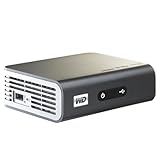
A lot of good things have been said for this player so I won't repeat them here. If you are on the fence about streaming media in your house, go do it, and this player delivers. I do want to share some specifics on my setup, and what I wish it would support:
Connectivity
I have a wireless b/g network, and an existing Apple Airport Express (AE) hooked up to my old stereo for music streaming. The stereo is close to the TV, not wanting to spend $40 to get a wi-fi adapter, I thought of just connecting the WD Live to the AE over Ethernet. Apple does not seem to advertise this "bridging" feature on the AE, but it does work. Via AE, my WD Live gets on my network without setup (AE is already on the network).
Later on I needed to move the WD Live to another TV upstair, and I had to get a wi-fi adapter (no AE nearby). Make sure you buy one from the list of supported adapters from the WD Live support website. At first I bought one with a model number that was 1-digit off from the list, it did not work. Returning it and getting another one from the list work the 2nd time. Sorry I can't remember the brand or models of the adapter, it was from Office Depot.
Finding media on PC/Mac
If you use Windows Media Player to manage your files, you are in good shape. WD Live will find everything from WMP when accessing your PC as a "Media Server" from the WD menu. So if you are not seeing some of your media, add them to your WMP library - no you do not need to keep WMP running while streaming. If you select "Network Share" to connect to your PC, you will find the shared folders on your PC. You should most definitely find everything this way, as long as you shared the folders.
WD Live will also find your Mac shared folders/drives, you just need to set up files/folders share on the Mac. As far as I can tell there is no connection to your iTunes libraries, just shared folders/drives.
Caution - WD Live will find a lot of stuff on your PC that you may not remember having nor want to put in front of the kids or guests :-)
Wireless Streaming (if you must)
The biggest challenge is placement of your wireless router and TV/WD Live. In my case the TVs are almost at opposite end of the house relative to the router. Use a laptop with wi-fi to check your signal strength around the house. If you worry about signal strength, and can't move your router as in my case, get a wi-fi adapter that comes with a USB extension cable. This way, you plug the USB wi-fi adapter to typically a small stand with 6' of USB cable, and you finally plug the stand cable into WD Live. Now you can place the wi-fi adapter with additional flexibility. I put it on top of my TV.
If you are getting intermittent connectivity, check your wireless router channel selection and power output. I was able to move to a channel and higher output on my wireless router, Qwest DSL 2700HG-D combo modem. I first noticed this when setting up my AE for music streaming, now things are working well.
My wireless setup streams low-res movies without issues. It does run into hiccups when streaming hi-res 720p movies from my PC - if the network is busy doing other things :-) When this happens, one 720p movie would play well for about 3-4 minutes, then drops audio, and slows video framerate. It would not recover, and putting the movie on PAUSE does not allow more buffering as it is with YouTube. This is a BIG drawback. To re-buffer, you must stop the movie, go back to the previous menu level, select the move to continue from previous. In my case, the movie would play another 3-4 minutes (network is still busy), has the hiccups, and I would have to repeat this process.
I repeated this test another time when the network was not busy, and it played fine. Not sure what would happen for 1080p wireless streaming. I suppose I can always connect a USB drive to the WD Live or go Ethernet.
CODEC/format support
I can play most files I have on the PC including MKV, ISO, but it would not play some of my WMV files. I see only WMV9 supported, this may be the issue. After connecting to my PC, I realize I have a lot of short video clips from my digital cameras, cellphones/etc now available for viewing on the TV (a big plus), but the WD Live would not play most of them. I believe the key missing codec is actually the old MJPEG, which many digital cameras would use.
Wish List
1. allow continue buffering/re-buffering when a movie is PAUSED when the network is busy
2. add more codec support for videos from digital cameras (MJPEG)
3. add codec support for videos from popular camcorders (FLIP, Sony, Canon, Panasonic, etc)
4. a bigger and more ergo remote (the small remote makes it hard to hit the right buttons, awful when you have to use the on-screen keyboard)
5. provide a small wireless keyboard for text entries (eg: YouTube searches). I don't want a big PC keyboard nor Blackberry-like tiny keys...something in between.
Get more detail about Western Digital WD TV Live Network-ready HD Media Player WDBAAN0000NBK-NESN.

No comments:
Post a Comment