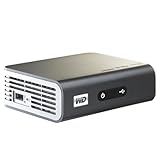
I was so excited to get this thing. When it works, it is amazing. But, it doesn't work. The latest firmware (.12) started "bricking" devices. Thankfully, I stayed on .11. This is one update after the debut firmware of .10. The .11 firmware is not mature enough for a product being sold on Amazon or other stores. If you buy this, you will be a beta tester for a product for which the company already has your money and does not owe you a thing in regards to better firmware. I raised critical issues about this product (see below) to Western Digital support, both on the phone and in their own support forums. 12 days have passed and there has been absolutely no response... no acknowledgment, no ETA for a fix, nothing!
I really want to own this product. The feature set and codec support are a good value at the price (comparable products might add better codec support and a limited web browser but at a much higher price). And, I am still following the forums to see if the critical issues will be fixed, even though I returned it to the store. I'd buy it again and re-review it if WD would fix the critical bugs.
Here are the critical issues with this unit:
1. Asynchronous audio - One of the cool things about the WD TV Live is that it offers an optical audio output in addition to the HDMI. For those of us using older A/V receivers that do not have HDMI switching, this is a selling point. However, it does not work. On certain mixes of codecs (primarily the popular H.264 with AC3 5.1) the lip synch is off. Upgrading my A/V receiver is not an option right now. Phone support from WD told me that the lip synch was off b/c I was "looking too closely at it". He tried to tell me that even in movie theaters I will notice the lip synch being off if I really look for it. Stupid! I told him that my old upconverting DVD player and Xbox360 are both hooked up the same way and there are no lip synch issues. He had no response. The issue is raised as a critical bug in the WD support forums and is being completely ignored by WD there.
2. Network drops - From what I understand, the older WD TV product is fantastic (and does not have the asynchronous audio problem). That older product is missing a key feature - network jack (there is a way to get on the network with a USB network adapter hack with some custom firmware). So being able to hook up the WD TV Live to your network and stream your media from your main server is a huge selling point for this product over the older one. Guess what? Doesn't work. At least not out of the box. Oh sure, you'll be excited because it does work for 4 or 5 minutes. The WD TV Live drops itself from the network (in the middle of watching a movie even) every 4 or 5 minutes. It also does so when another device appears or drops from the network (if my wife turns on her laptop while I'm streaming media from my main server the WD TV Live drops). There are some workarounds, but they are inconvenient or they require you to disable features (for me, I turned off the option to have the WD TV Live appear on my network as a device - which cripples the feature that I could use it as a cheap NAS with USB hard drives attached to it). Another workaround is to turn on the WD TV Live, navigate to your network share folder and then let it sit for 5 minutes before starting your movie. What?!? (and I believe you'll still get dropped in that scenario when your wife turns on her laptop.)
3. Thumbnails - I stream media to my Xbox360 using TVersity on the PC. But, one of the reasons I got the WD TV Live was so that my wife and kids could access media without turning on the Xbox360 (and I was looking forward to watching movies without a system fan roaring in the background). How cool would it be if my wife and kids could browse our media over the network (this issue only applies to networked media, not media you have on a locally attached USB drive) using pretty pictures instead of a text list? That'd be very cool. Doesn't work. If your media type doesn't support embedding a thumbnail picture, there is a way to get a thumbnail - you drop the .JPG thumbnail for your movie into the same folder and you name it the same. So OurMovie.MKV would have the OurMovie.JPG thumbnail. Good idea, except that when you actually access that folder with the device to watch the movie, all of the .JPGs for all of your movies are shown separately and shown first. Clicking on them loads them up in the Live's picture viewer (does not start the movie). You have to scroll all the way down past your .JPGs to see the movie files (which ARE showing the thumbnail).... but now you've got two of the same image and depending on which you click, you'll either get a movie or a picture. This means that you actually have to look for the file extension text below the thumbnail to see what you'll be clicking on. Totally defeats the purpose of having the thumbnail in the first place. Stupid!
4. YouTube - WD is using YouTube access as a selling point for this product. This has upset Google. Probably the most popular product in this category of device is the Popcorn Hour machines. Starting Dec. 2, they have been forced by Google to remove YouTube functionality from their devices. There has been no word from WD about their current position with Google. But, the forums are abuzz currently that YouTube functionality has broken... and it actually appears to be something YouTube (Google) did... not b/c of a WD firmware change. Think about that. YouTube service can be disrupted at any moment by simple changes to the API by Google. Without a good contract in place between WD and Google, WD will either need to remove YouTube or dedicate some developers to updating the WD firmware to stay in synch with Google's API (at least until Google threatens a suit). WD is not "some Chinese company" - they are not going to take this risk. And, judging by their complete absence in their own support forums and complete ignorance of their Level 1 and Level 2 phone techs, there MAY NEVER be any future firmware upgrades for this crippled, hobbled device.
A note about power consumption - I was also excited at the prospect of the WD TV Live using a lot less electricity than my Xbox360. And it does, while in use. It uses 6 watts while streaming full 1080p video with surround sound from the network. When sitting idle in one of its menus (or when the screensaver kicks in) it uses 5 watts. This is fantastic! However, when you power down the unit, it does not turn off. The front power LED turns off and it does not send signals to the outputs, but it's still on and using 4 watts. Considering how much time I'll use the device vs. how much time it will sit idle in standby mode, I'm not excited about that constant 4 watt drain. (This is coming from a guy who is burning only 4.5 watts total across three ceiling can lights in his basement stairwell instead of 180 watts thanks to LED bulbs.)
The device has promise, but the company that makes it does not have a good track record for continued support and fixes via firmware updates. I returned it b/c I'd rather have my own money than give it to WD with the wishful thinking that they'll fix the problems.Get more detail about Western Digital WD TV Live Network-ready HD Media Player WDBAAN0000NBK-NESN.

No comments:
Post a Comment