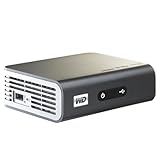
The search for a reasonable media device continues. This is my 3rd media device, and as much as I wanted to like it, it fell down on several fronts. I guess I'm going to simply have to break down and purchase a full HTPC.
First, an important setup note that's not mention in the setup guide. The device defaults to *composite* video out of the box. The manual states that the unit has an "Auto" function, but my device was set to "Composite". Don't bother hooking up your HDMI cable, as you won't get a picture. You must first hook up the composite cable that comes in the box, navigate to the settings/video menu, and change the output to HDMI. Of course, at that point you'll lose the picture, and then you can hook up the HDMI cable. OK, I know it's a minor nit, but why on earth would a company market a "1080P HD" device, and default it to composite? Other than that, it was easy to set up.
The big advantage of this next generation device is that it has network support. Unfortunately, it appears that the support was hacked together without much thought as to how it should integrate with the existing functionality.
In particular, attached USB drives can be organized in a "media library". Pictures, movies, and music will be organized by type, regardless of where they reside on the hard drive. From the user's guide: "Media Library Compilation refers to the process of scanning and consolidating the media contents of a USB drive into one comprehensive database so that you can easily browse and locate media files based on certain metadata information (e.g., video files are categorized based on title or release date)."
Unfortunately, there doesn't appear to be any way to incorporate media on the network (i.e. media servers, network attached storage) into the library. To access media on the network, you have to navigate a seemingly endless chain of menus. For example, my photos are stored on a NAS (e.g. MyNAS) in a folder media/pix. To view a photo, you navigate through the menus via Photos->Network Shares->MyNAS->Media->Pix. That's way too many clicks to get to a photo, mp3, or video. At a minimum, a shortcut feature would be nice.
Perhaps a future firmware upgrade will incorporate the network media into the library, but the current functionality is seriously wanting in the usability area.
A more significant issue is that the device is periodically rebooting itself when I forward to the next song while in shuffle play. If I select a folder and hit "Play", it'll randomly select a song and start playing it. If I skip to the next track, 2 or 3 times out of 10 the device will reboot itself. There's a serious bug in the software. This is a showstopper, as I planned to mainly use the device to stream music to my home theater. I checked for a firmware upgrade, but I'm using the latest version. I can't imagine that this is a hardware defect, as the rest of the features appear to work fine.
Another negative is the lousy remote. It's too small, has a poor button arrangement, and has no back-lighting. I know many people will dump it for a universal remote, but there's no excuse for this piece of junk.
On the positive side, the codec support is top-notch, and the speed of the UI is generally acceptable. It powers up in ~8 to 10 seconds, and the menu transitions are snappy. However, accessing media on the network (via cat 5) results in a lag of a few seconds as the device logs in to the NAS or server. Not the end of the world, but a minor annoyance.
In a nutshell, this player appears to have been rushed to market. I can see why the original device got such good reviews, as the management of local media is very good. However, if you're planning to use the device primarily to access network-based media, you'll be disappointed. Sure, you can access media on the network, but it's not seamlessly integrated in the media library, and as a result, usability sufers.
I'll probably hang on to the device for a few weeks to see if a firmware upgrade addressed any of the issues, especially the random reboot. If not, it's going to heading to Ebay for a quick auction.
Get more detail about Western Digital WD TV Live Network-ready HD Media Player WDBAAN0000NBK-NESN.

No comments:
Post a Comment